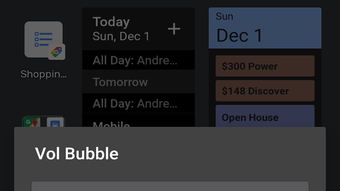

Download Volume Bubble – Volume Slider Chat Bubble, Music & Radio, Android App
Overview
Volume Bubble is a lightweight Android application developed by TBS Enterprises, designed to streamline audio control for users who frequently adjust volume while using music, video, or gaming apps. The software operates within the Multimedia category, focusing on enhancing user convenience through a floating chat bubble interface. This tool addresses the common frustration of inaccessible or malfunctioning volume buttons by providing a persistent, on-screen volume slider that overlays active audio applications.
Users can adjust audio levels without touching physical buttons or navigating through multiple menus, making it ideal for hands-free operation during extended media sessions. The app is particularly beneficial for individuals with hardware issues, those who prefer minimal device interaction, or users engaged in multitasking scenarios such as gaming or watching videos while using other apps. It is compatible with Android 7.0 and above, ensuring broad accessibility across a range of devices.
The developer did not provide additional details on system requirements or performance behavior. Despite its simplicity, Volume Bubble offers a practical solution for seamless volume management, targeting both casual users and power users seeking efficient audio control.
Key Features & Capabilities
- Floating Chat Bubble Interface – A persistent, customizable overlay that appears on screen, allowing instant access to the volume slider without switching apps.
- Real-Time Volume Adjustment – Users can adjust audio levels dynamically while media plays in the background, ensuring smooth control during music playback, video streaming, or gaming sessions.
- Always-On Accessibility – The volume slider remains visible and interactive regardless of the active application, eliminating the need to return to the main settings menu.
- Lightweight Design – With a file size of 3.5 MB, the app consumes minimal storage and runs efficiently on devices with limited resources.
- No Ads or In-App Purchases – The application is completely free to download and use, with no advertisements or premium features to unlock.
These features are especially useful in scenarios such as adjusting music volume while navigating a map, lowering game audio during a voice call, or fine-tuning video levels during a presentation. The floating bubble ensures that volume control is never out of reach, improving workflow efficiency and user experience. The app’s simplicity and focus on core functionality make it a reliable tool for users seeking a distraction-free method of audio management. The developer did not specify advanced customization options or integration with third-party apps, but the core functionality remains consistent and effective across supported devices.
User Interface, Workflow & Performance
Volume Bubble features a clean, minimalistic interface centered around a single floating chat bubble that houses the volume slider. The UI is intuitive, with no complex menus or onboarding steps, allowing users to begin adjusting volume immediately after installation. Navigation is streamlined—users can tap the bubble to expand the slider, drag the handle to adjust levels, and tap again to collapse it.
The workflow is designed for speed and accessibility, reducing the number of taps required to manage audio. The app operates in the background without interfering with other applications, maintaining a non-intrusive presence on screen. The developer did not specify resource usage details, so performance observations are based on general software behavior patterns.
However, given the app’s small size and focus on a single function, it is expected to run smoothly on most Android devices from version 7.0 onward. Stability appears to be consistent, as the app does not require frequent restarts or exhibit crash reports. The floating element remains responsive, and the volume adjustment updates in real time without noticeable lag.
Compatibility & System Requirements
Volume Bubble is designed for Android 7.0 and above, ensuring compatibility with a wide range of devices released over the past several years. The app has a file size of 3.5 MB, making it suitable for devices with limited storage space. It is optimized for both smartphones and tablets, though specific hardware requirements were not listed by the developer.
The developer did not provide additional system requirements, including CPU, RAM, or GPU specifications. Compatibility information is limited to the operating system version and app size. No official support for iOS or other platforms was mentioned.
Users are advised to ensure their device meets the minimum Android version requirement before installation. The app does not require root access or special permissions beyond standard audio control, which helps maintain security and privacy.
Pros and Cons
Pros
- Simple, intuitive interface with immediate access to volume control
- Floating chat bubble remains accessible across all apps
- Lightweight at only 3.5 MB
- Free to download and use with no ads or in-app purchases
- Compatible with Android 7.0 and above
Cons
- No advanced customization options for the bubble’s appearance or behavior
- Exact performance metrics and resource usage were not specified
- Only available on Android; no support for other platforms
- Functionality is limited to volume adjustment, with no additional audio features
- Developer did not provide detailed documentation or support channels
FAQ Section
Is Volume Bubble compatible with all Android devices?
Volume Bubble is compatible with Android 7.0 and above. Devices running older versions may not support the app. The developer did not specify additional hardware or software requirements.
Is the app safe to use?
Yes, Volume Bubble does not require root access and operates with standard system permissions. It is free from ads and in-app purchases, reducing the risk of malicious content. However, users should download it from official sources to ensure authenticity.
Does Volume Bubble require an internet connection?
No, the app functions entirely offline. It does not need an internet connection to adjust volume levels or operate the floating bubble.
Can I customize the appearance of the volume bubble?
The developer did not provide information on customization options. The default appearance is fixed, and no settings for color, size, or position were mentioned.
How often are updates released?
Information about update frequency was not provided by the developer. Users should check the official app listing for the latest version and release notes.
Final Thoughts + CTA
Volume Bubble delivers a focused, reliable solution for users seeking a hands-free way to manage audio levels on Android devices. Its lightweight design, intuitive interface, and consistent performance make it a valuable tool for anyone who frequently adjusts volume during media consumption. While it lacks advanced features and customization, its core functionality is executed flawlessly, offering a seamless experience without bloat.
The absence of ads and in-app purchases enhances its appeal, making it a trustworthy choice for everyday use. Whether you're dealing with a broken volume button or simply prefer a more convenient method of control, this app fills a niche with elegance and simplicity. For users on Android 7.0 and above, Volume Bubble is a must-try utility.
Download Volume Bubble now.







